
Today's Dragon Tip
Color markingFor really tricky puzzles you may need to mark squares to let you see patterns to help solve them. Sudoku Dragon has six different colors available for use and the color allocation can be undone and re-done just like setting square possibilities.
Read More
Generate Sudoku Puzzle [Page 2 of 14])
 <
<
 > Next
The generation of new puzzles is a key feature of Sudoku Dragon. You can also download new puzzles from our web site including all the hundreds of free daily puzzles.
When you generate a puzzle you have the option of choosing the level of difficulty from gentle to very challenging. The hard puzzles vary enormously in difficulty as different players use a range of strategies for solving the puzzles. The same puzzle will be easy for some people and impossibly tricky for others.
You can select from a wide range of grid sizes. The 9x9 is the most common size. The smallest 4x4 size is ideal for getting to know the basics while 20x20 puzzles offer a new level of challenge that can be truly daunting. You can choose a size that matches your level of skill.
We offer a range of different forms of the Sudoku puzzle:
- The standard Sudoku puzzle that you find in most puzzle books and newspapers.
- Our own special variation hides a Stripe somewhere within the puzzle. This ensures that the puzzle will have one group with all the numbers (or letters) in order. So one row, column or region should be easy to solve. The order can be 1;2;3;4;5;6;7;8;9 or reversed 9;8;7;6;5;4;3;2;1 and it can be located anywhere in the grid. This makes the Sudoku puzzle a little more fun to solve as finding the stripe can be a useful new way of solving the puzzle. In a hard Sudoku puzzle with so few revealed squares it can be a struggle to discover where the stripe is located.
- You can play Diagonal or X-Sudoku. In this variation both the diagonals in the puzzles have to have all the numbers once as well as the rows; columns and regions.
- There is Word Sudoku. In this version letters are used instead of numbers. Somewhere in the grid in a row or column is a hidden nine letter word. By solving the puzzle the word is revealed. This is a new twist to Sudoku puzzles. Each time a different word is chosen from the thousands available.
- We provide Jigsaw or Squiggle Sudoku. This resembles standard Sudoku except that the regions are no longer rectangular they are all irregular. Each new puzzle you generate will have a different pattern of regions as these are chosen at random each time.
- Lastly we provide Samurai Sudoku. In this type there are multiple overlapping puzzles all in one grid. We support a 8x8 (with 4 numbers and 3 sub-puzzles) and a 21x21 (with 9 numbers and 5 sub-puzzles) sized version.
Normally 9x9 puzzles use the numbers 0 to 9, but for larger grid sizes there are not enough numbers and so letters are used instead. If you prefer you can use letters for any puzzle size - even 4x4.
The more advanced puzzle player might like to experiment with puzzles that are asymmetric. These do not have the attractive symmetric pattern but a random initial pattern. These puzzles can be much more difficult to solve. The repeated pattern can use rotational symmetry or mirror symmetry.
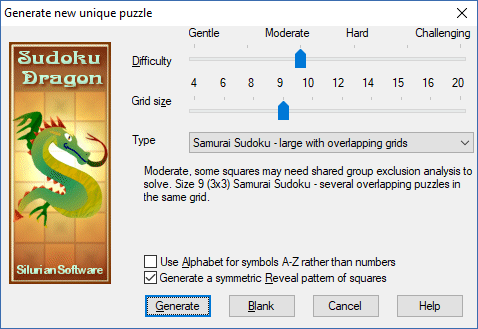
 You can download Sudoku Dragon for a free 23 day trial and generate as many new puzzles as you like. Go to our download page.
- Tour Guide
- Generating a new Puzzle
- Square allocation list
- Sudoku puzzle types
- Puzzle solution hints
- Annotating squares
- Explaining possibilities
- Showing possible square assignments
- Possibility display control
- Automatically solve 'easy' squares
- Coloring squares
- Large Sudoku puzzles
- Improve your speed
- Puzzle display skins
Copyright © 2005-2024 Sudoku Dragon