
Sudoku Solver Tour [Page 1 of 14])


 > Next
Today's Dragon Tip
4x4 IntroductionIf you are new to Sudoku then you may find the simpler 4x4 grid an ideal starting point. All the Sudoku rules and strategies come into play but there are far fewer choices to consider.
Read More
These 14 pages give a quick tour of our Sudoku puzzle solver.
The solver provides many display options for puzzles. The menu and toolbar have a host of useful options all documented in our context sensitive help topics. They are also available from the keyboard, many as function keys.
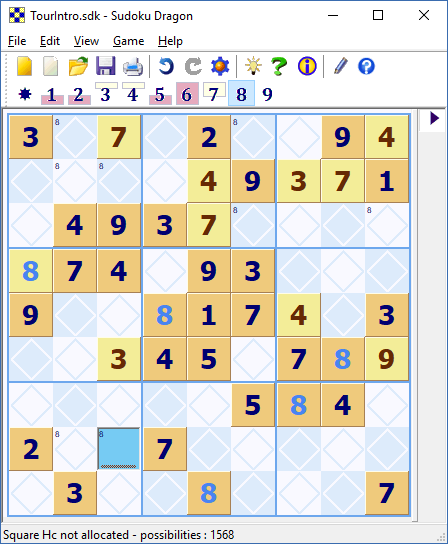
This screen shot shows a Sudoku puzzle being solved at the 'beginner' level. Many of the possible Sudoku square allocations are color coded to make solution straightforward. In this puzzle all the occurrences of the number 8 have been highlighted using the possibility toolbar.
Any squares that might possibly take the number 8 are indicated by a small number in the top left corner. This is one of the many optional features of Sudoku, experts may prefer to work these out for themselves. The square Ci is one that can be easily solved, the region Ag has an 8 missing and because of the occurrence of 8's in squares Gg and Fh, Ci is the only square in the row that a 8 can be allocated in this region. Two of the '8's are highlighted (this is an option) to indicate they can not be allocated in the squares Ab and Cf. Cf is not possible because 8 must go in Ci in the same row C. Similarly 8 can't go in Ab because in region Aa it must occur in row B because Ed and Da forces the 8 into either Bb or Bc and so it can't go in Ab. To make this clear, the program highlights these possibilities for 8 with a dark background. These features, as well as many others, can be set to match your level of skill, providing just the right amount of assistance you need to solve a puzzle.
 You can download Sudoku Solver for free 23 day trial from our download page.
- Tour Guide
- Generating a new Puzzle
- Square allocation list
- Sudoku puzzle types
- Puzzle solution hints
- Annotating squares
- Explaining possibilities
- Showing possible square assignments
- Possibility display control
- Automatically solve 'easy' squares
- Coloring squares
- Large Sudoku puzzles
- Improve your speed
- Puzzle display skins
Copyright © 2005-2024 Sudoku Dragon