
Automatic Allocation of Sudoku Squares [Page 10 of 14])
 <
<
 > Next
Often there are a lot of 'easy' Sudoku squares to solve and it can be tedious just to work through each one. Sudoku Dragon offers an automatic allocation command to scan the Sudoku grid and find one square that is easy to solve and allocate it for you. It will only locate squares that have only one possible allocation using the only choice, single possibility, or the only square rules, it will not solve squares requiring more detailed analysis. [You can select whether automatic allocation should just the 'only choice' rule using the Options screen].
In this partially completed puzzle there are 20 squares that can be solved using Automatic Allocation leaving only five that need more carefully study. The command is available from the toolbar, menu and the F12 function key. Any squares that have been solved automatically are marked with a special 'cog' icon in the list of square allocations at the side.
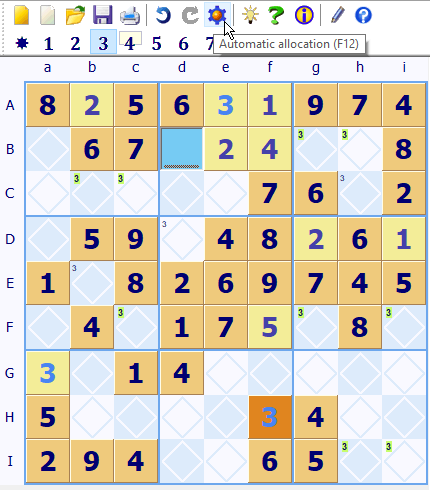
3 must be allocated in square Dd because it is the only unallocated square in the central region Dd. Sudoku Dragon can allocate this easy square automatically by pressing the F12 key.
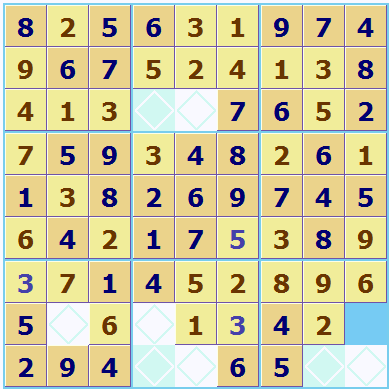
Sometime later when solving this puzzle there are only a few squares left. If you consider square Hi, in column i only 3 and 7 are possible but the 3 in row H means that 3 is not actually possible, so this leaves 7 as the only possibility left for Hi so Sudoku Dragon can allocate this 'easy' square automatically for you.
You will find automatic allocation useful to mop up the last few 'easy squares' at the end of solving a puzzle.
 Try out SudokuDragon for free 23 day trial from our download page.
Use it to take away all the tedious tasks of Sudoku puzzle solving, leaving you with just the interesting squares to sort out.
- Tour Guide
- Generating a new Puzzle
- Square allocation list
- Sudoku puzzle types
- Puzzle solution hints
- Annotating squares
- Explaining possibilities
- Showing possible square assignments
- Possibility display control
- Automatically solve 'easy' squares
- Coloring squares
- Large Sudoku puzzles
- Improve your speed
- Puzzle display skins
Copyright © 2005-2024 Sudoku Dragon