
Possibility Toolbar [Page 9 of 14])
 <
<
 > Next
Showing all the Sudoku possibilities at once can be useful when looking for squares that are easy to solve, but the full information is too much to take in at a glance.
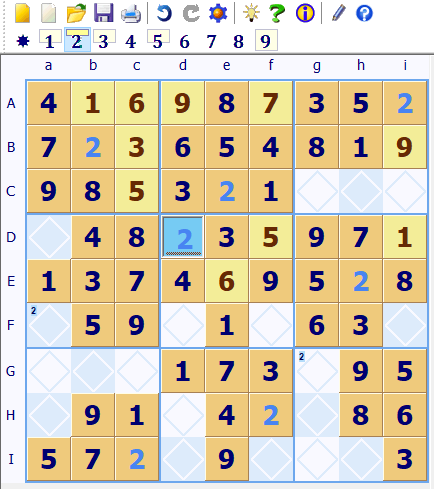
Sudoku Dragon uses a Possibilities toolbar to control which square possibilities are shown. It is used in conjunction with the other View | Options to highlight possibilities for squares. The Possibility toolbar is conveniently shown above the grid. You select a possibility number in the bar by clicking on it or pressing the ALT key and the number key. Showing possibilities for all the numbers is achieved by clicking on the first star ( ) option on the bar (or the F4 function key).
The toolbar selects one particular number so that all possible squares in the grid for that number (or letter) are highlighted in the Sudoku grid.
The bar also indicates the number of squares remaining for each number. The small cream boxes behind the 1; 2; 3; 5 and 9 indicate that each of these has only two squares left somewhere in the grid.
In this screen shot 2 been selected in the possibility bar. So all currently allocated 2's are highlighted in the Sudoku puzzle and the automatic possibility settings are set so that any unallocated square in the grid that can take a 2 has a small 2 shown in the top left corner. In this case the remaining two 2's can only go in two squares Fa and Gg.
 You can download SudokuDragon for a free 23 day trial. Go to our download page.
- Tour Guide
- Generating a new Puzzle
- Square allocation list
- Sudoku puzzle types
- Puzzle solution hints
- Annotating squares
- Explaining possibilities
- Showing possible square assignments
- Possibility display control
- Automatically solve 'easy' squares
- Coloring squares
- Large Sudoku puzzles
- Improve your speed
- Puzzle display skins
Copyright © 2005-2024 Sudoku Dragon