
Sudoku Help - Possibility Highlight Options
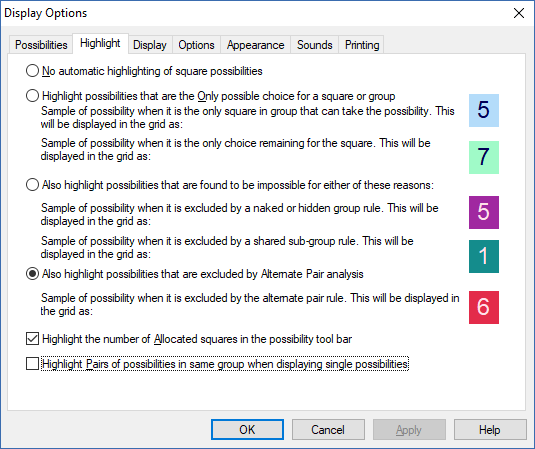
When you are using the automatically displayed possibilities you may need some help in working out which of these actually apply. Sudoku Dragon indicates which ones are allowed or forbidden by highlighting the individual displayed numbers in the grid. You can change this option at any time. The 'Possibilities' tab lets you select which squares and possibilities are to be displayed this way.
Within the possibilities there may be some that can be quickly shown to be 'forced'. This occurs when one of the possibilities is the only conceivable one allowed (only choice; only place or single possibility rules). If you would like an explanation as to why the program reckons that this is the only choice you can use the Game hint or Possibilities option to explain what is possible and what is impossible (depending on the current ananalysis level). A sample of what the highlighted possibility will look like is shown in the sample after the name of the rule. A different color combination is used for the ‘only choice’ and ‘only square’ allocation rules.
More complex are the excluded possibilities. The Sudoku rules produce some interesting ‘positive’ rules (only certain allocations are possible) but also some ‘negative’ ones (certain allocations are not possible). You can choose whether to see these excluded possibilities. If you would like an explanation as to why the program reckons that a possibility is excluded then you can use the Possibilities option to explain why it is not possible. A different color combination is used for the ‘excluded group’ (for example naked twin) and excluded shared sub-group rules.
Tracking the number of possibilities remaining is helpful. If a particular number has only one or two squares remaining then that is a good number to try to solve. If only a few squares are filled in for a particular number then this may require a new strategy to solve them. Sudoku Dragon uses a special graphical display on the possibility bar to show that all squares for that number have been solved; only one remains; two remain to be solved or none solved; only one solved or only two solved.
Tip: If you pause the mouse cursor over the possibility bar the tool-tip will show the number of squares filled in so far. The toolbar can also show a background indicating how many squares are allocated/need to be allocated.
For hard puzzles it is often necessary to look for Alternate Pairs. Sudoku Dragon can do this for you automatically. The background color for these pairs of possibilities is shown - but only when a single possibility is to being highlighted in the grid.
- Changing the Settings
- Changing the Possibility Display
- Changing the Highlighting of possibilities
- Changing the Display settings
- Changing general settings
- Changing the Appearance
- -- Changing the Colors
- -- Changing the Style
- -- Choosing fonts
- -- Creating a new Theme
- Making a noise
- Print options
Copyright © 2005-2024 Sudoku Dragon