
Sudoku Help - Font Selection
The standard themes available with Sudoku Dragon use the widely available Arial and Georgia fonts (and some others) for displaying text in the grid. You can select different fonts if you prefer a more distinctive appearance to your own custom theme.
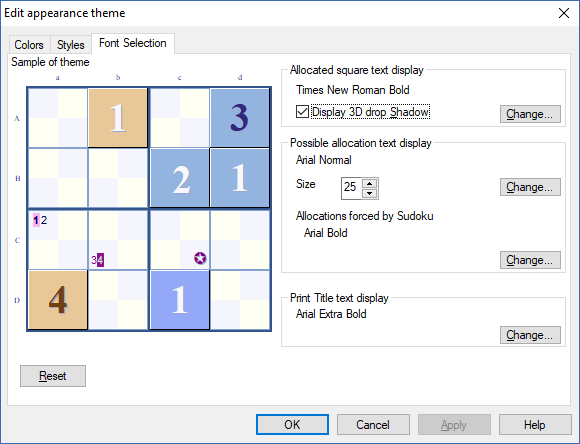
To select a font for the allocated squares of the grid use the Font for allocated squares and press the Change... button. A Font selection screen will appear to let you choose the font.
The allocated squares can optionally have a 3-D display effect. This is achieved by displaying text as a dropped shadow. Tick the check box if you wish to enable this feature.
You can also select the fonts used for the Sudoku square possibilities indicated on unallocated squares or your choices. The possibilities are displayed in a smaller font size. Change the proportion of the grid square to change the text size. A preview of the new setting is automatically shown. You can use any font for these squares. To change the font click on Change... button.
Another font you may like to change is that used on the print-out for the title and notes/allocation information. This can be altered using the Print Title text display section Change... button.
The new font will be shown in the preview section on the left when you make a change. The edits to the theme come into effect when you press OK. You can change the colors too, simply click on the Color tab at the top of the sheet. To restore the font settings back to the default press Reset
- Changing the Settings
- Changing the Possibility Display
- Changing the Highlighting of possibilities
- Changing the Display settings
- Changing general settings
- Changing the Appearance
- -- Changing the Colors
- -- Changing the Style
- -- Choosing fonts
- -- Creating a new Theme
- Making a noise
- Print options
Copyright © 2005-2024 Sudoku Dragon