
Sudoku Help - Solution Hints
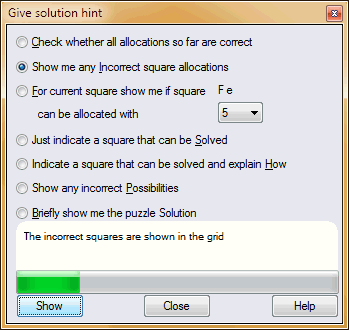
There often comes a time when solving a Sudoku puzzle that you can find no further square that you can see how to solve. Sudoku Dragon comes to the rescue with a handy range of hints, ranging from a gentle suggestion to revealing the complete solution to the Sudoku puzzle.
Simply click on the type of hint you would like and then the hint will be displayed in the screen or the main grid - depending on the type of hint an information box may then be shown.
It is accessed from a toolbar button, Game | Hint from the menu or the F9 key.
The hints available are :
- Make sure that all the squares you have allocated so far is correct. This just says Yes they are OK or a No response if there is a problem with the allocations you have made to the squares.
- Checks all the Sudoku squares you have allocated so far are correct and also briefly reveals any squares that have been incorrectly allocated.
- Shows information about the possibility of a particular symbol occurring in the current square. Simply select the symbol you want to check from the drop down list. The reasoning and the squares involved are highlighted in the main grid. The reasoning remains visible until you click on OK. (This hint uses the current level of possibility analysis you have selected.)
- Shows a square (if there is one) that should be able to be solved fairly simply. The square is briefly highlighted in the grid.
- Similarly shows a square (if there is one) that should be able to be solved fairly simply but this time gives a brief explanation of how it might be solved.
- You can use possibilities to indicate the Sudoku possibilities you have determined for the square. (This hint uses the current level of possibility analysis you have selected.) You can use this option to check that the possibilities that you have marked are correct. Any incorrect assumptions are highlighted in the grid. The check will not show 'missing' possibilities, only the ones you have marked. It will count as possibilities any number that is directly possible - it will consider a possibility acceptable that could be excluded due to 'exclusion rules'.
- Briefly reveal the complete solution in the main grid.
The hint display is kept visible until you close it by selecting Game | Hint or the F9 key again, press Close, press ESC key, click on the top right 'x' button in the caption or click on the hint tool in the toolbar.
- Getting a Sudoku Puzzle
- Generating a new Sudoku Puzzle
- Create a new blank Puzzle
- Downloading a Puzzle
- Game Hints
- Puzzle Types
- Difficulty Analysis
- State of the Game
- Puzzle timer
- Printing out a puzzle
- Keeping puzzle solving scores
- The Sudoku Stripe
- Busy
Copyright © 2005-2024 Sudoku Dragon