
Sudoku Help - Adding Sound
You have full control over how you want to interact with Sudoku Dragon.
Some players like to get sound effects as they play the puzzle. Others definitely do not. You can switch on or off the sound effects at any time. If it is only one or two effects that grate on the nerves you can change or switch these off using the Sounds options.
To enable all sound effects click on the Produce sound option; to only produce sounds on game start and completion select the third option; to switch off all sound effects click on the Do not give any sound effects option.
The other controls on this page let you edit each individual sound, selecting your own sound or disabling it.
All the sound effects are listed, including those for a bad square allocation, new puzzle and the completion of a game.
To select your own custom sound effect to play, first select the action in the list and then press the Browse (...) button alongside the edit field. Sudoku Dragon uses the popular .wav (Wave) file format for sounds.
If, on the other hand you do not wish to hear the sound at all, select the item in the list and then click on the Do not make a sound option. You can always restore it, by re-selecting the Default sound at some later date.
To check what it sounds like hit the Test button or double click an entry in the list. Use the Reset button to restore the sound effects to their original settings.
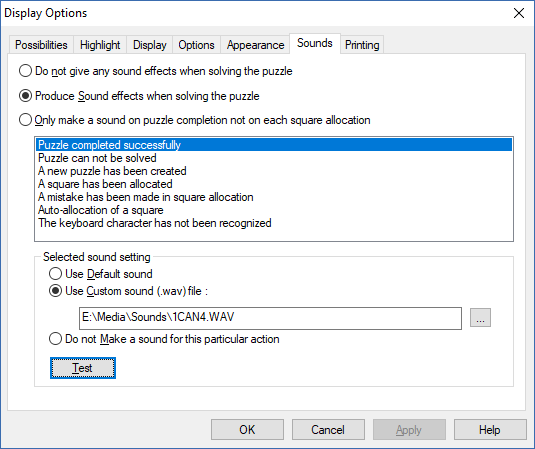
- Changing the Settings
- Changing the Possibility Display
- Changing the Highlighting of possibilities
- Changing the Display settings
- Changing general settings
- Changing the Appearance
- -- Changing the Colors
- -- Changing the Style
- -- Choosing fonts
- -- Creating a new Theme
- Making a noise
- Print options
Copyright © 2005-2024 Sudoku Dragon