
Sudoku Help - Generate a new puzzle
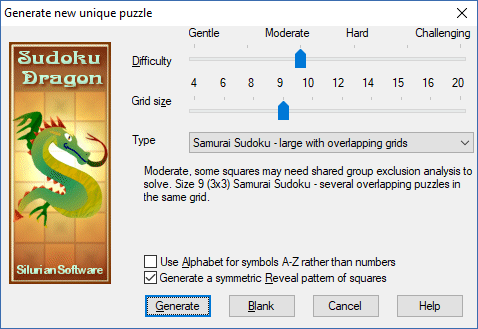
If you want a brand new puzzle to solve you can just generate a new one simply and easily. Alternatively you can download a new puzzle from our web site or start off with a completely blank grid. The program generates a new 'random' puzzle and as there are billions to choose from, you are not going to get the same one ever again.
We support a large range of grid sizes, by far the most often used is the standard 9 x 9 grid. Smaller grids (4; 6; 8) are however useful for learning the basics of Sudoku. Larger grid sizes are available, the 16 x 16 and 20 x 20 are super-sized ones that we offer as a challenge for a dedicated puzzle solver.
Choosing the level of difficulty is more tricky as the way you solve Sudoku puzzle solving is very individual. A puzzle that one person finds easy someone else may find daunting. We use an algorithm to carefully check whether a new puzzle is hard or easy to solve but the intervening ‘moderate’ levels of difficulty may not generate the level of challenge you expect. It is worth experimenting with the different levels until you find one that meets your requirements but the random nature of the generation will ensure that no two Sudoku puzzles are ever quite the same.
There are many different forms of Sudoku around these days. We support the more interesting versions. For more information please visit our Sudoku puzzle types page.
- There is the standard puzzle that is most often printed in magazines and newspapers.
- Then there is our own special version which is the inclusion of a Stripe somewhere within the puzzle. This ensures that the puzzle will have one group with all the numbers (or letters) in order. So one row, column or region will be easier to solve. The order can be 1;2;3;4;5;6;7;8;9 or reversed 9;8;7;6;5;4;3;2;1 and it can be located anywhere in the grid. This makes the Sudoku puzzle a little more fun to solve as finding the stripe can be a useful new way of solving the puzzle. In a hard Sudoku puzzle with so few revealed squares it can be a struggle to discover where the stripe is located.
- You can also play Diagonal or X-Sudoku. In this variation both the diagonals in the puzzles have to have all the numbers once as well as the rows; columns and regions.
- We also provide Word Sudoku. In this version letters are used instead of numbers. Somewhere in the grid in a row or column is a hidden nine letter word. By solving the puzzle the word is revealed. This is a new twist to Sudoku puzzle solving. Each time a different word is chosen from the thousands available. It is only available in the 9x9 grid.
- We support Samurai Sudoku. It consists of several standard 'sub-puzzles' within the grid. They overlap so there are some squares in common between separate puzzles. We only provide this in size 4 and 9 due to the limitations of this puzzle type.
- There is even Chinese Sudoku; in this version Chinese characters are used instead of numbers. The Chinese phrase is the same as the Word version except that characters are used in place of letters. Somewhere in the grid in a row or column is a hidden nine letter Chinese phrase. The Chinese number version just uses the Chinese characters for the numbers 1 to 9.
- Symbol Sudoku uses abstract symbols for the numbers 1 to 9.
- We also provide Jigsaw or Squiggle Sudoku. This is like standard Sudoku except that the regions are no longer rectangular they are all irregular. Each new puzzle you generate can have a different pattern of regions as these are chosen at random each time.
You can choose to display the symbols in the standard Sudoku grid with the numbers ‘1’ through ‘9’. If you choose the 16 grid size the program will use the ‘hexadecimal numbers’ ‘0’ to ‘9’ and ‘A’ to ‘F’. You can also choose to use letters rather than numbers for the grid. This uses ‘A’ to ‘I’ for the 9x9 grid and ‘A’ through ‘P’ for the 16x16 grid.
It is normal for Sudoku puzzles to have a symmetric pattern of squares initially revealed. Some Sudoku players take different views on this. The symmetry may be rotational (180 degree or 90 degree) or it may be mirror symmetry (vertical or horizontal). The symmetry is chosen at random. Choosing a 'random' pattern can make a puzzle more challenging to solve but it may be less aesthetically pleasing to look at.
To create the new puzzle press Generate, to create a new blank one with no squares filled in press Blank.
- Getting a Sudoku Puzzle
- Generating a new Sudoku Puzzle
- Create a new blank Puzzle
- Downloading a Puzzle
- Game Hints
- Puzzle Types
- Difficulty Analysis
- State of the Game
- Puzzle timer
- Printing out a puzzle
- Keeping puzzle solving scores
- The Sudoku Stripe
- Busy
Copyright © 2005-2024 Sudoku Dragon