
Sudoku Help - Downloading a puzzle
Our web site http://www.sudokudragon.com has a large collection of Sudokus of varying difficulty including new puzzles every day. To get a puzzle from the web site, use the File | Download New... menu command.
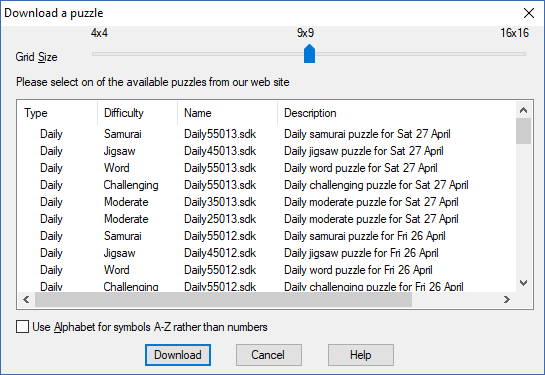
First select the grid size you want, by far the most often used is the standard 9 x 9 grid. The 4 x 4 grid is useful for learning the basics of Sudoku. Larger grid sizes are available, 16 x 16 are super-sized puzzles that we offer as a challenge for the dedicated solver.
You are welcome to download and play any of the puzzles available online. After fetching the list of puzzles from the Internet this screen will show the ones that match your selections. Any puzzles that have been already downloaded will be indicated by a tick mark in the first column.
You can select to display the symbols in the standard Sudoku grid with numbers ‘0’ through ‘9’ or alternatively the letters ‘A’ through ‘I’. If you select a grid size larger than 9 then there are not enough numbers, so the program will always choose to use the letters ‘A’ through ‘P’..
To fetch a particular puzzle, simply select the puzzle you want from the list and press Download. A copy will be downloaded and opened ready for you to solve.
- Getting a Sudoku Puzzle
- Generating a new Sudoku Puzzle
- Create a new blank Puzzle
- Downloading a Puzzle
- Game Hints
- Puzzle Types
- Difficulty Analysis
- State of the Game
- Puzzle timer
- Printing out a puzzle
- Keeping puzzle solving scores
- The Sudoku Stripe
- Busy
Copyright © 2005-2024 Sudoku Dragon